START HERE
1. Found your airline
Join a world, fill in the founding form and find your way around the game.
This is part 1 of the walkthrough for a new airline. Each part follows the same example, Pennine Air, founded at Manchester in Realistic 1, a world that runs from 1985 to 2035 at 144×, a game day every 10 real minutes. The figures are from that world; yours will differ with the world, the date and your choices.
Step 1: Sign in
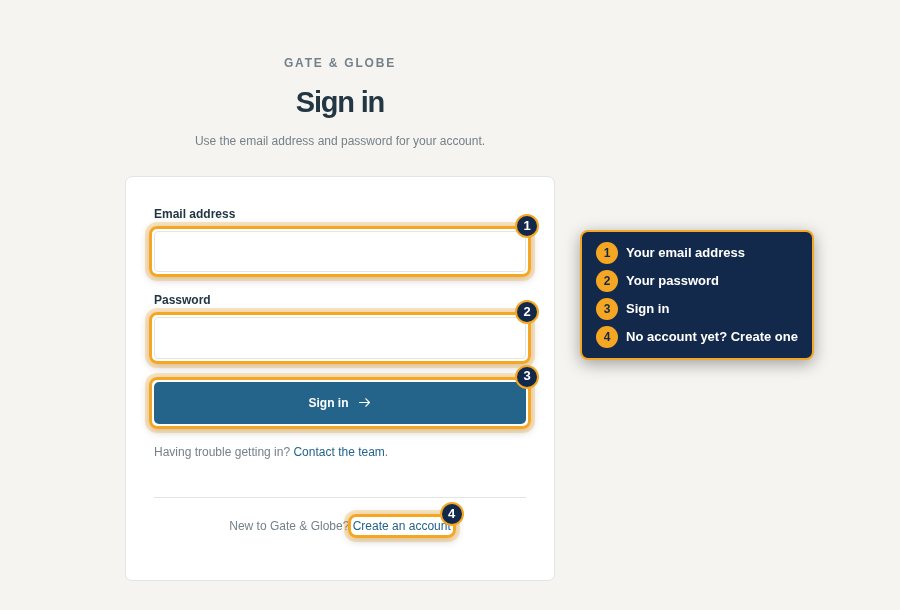
You need a Gate & Globe account to play. It is your identity in every world and on the forum, and your career record, results and trophies stay on your profile.
Step 2: Choose a world
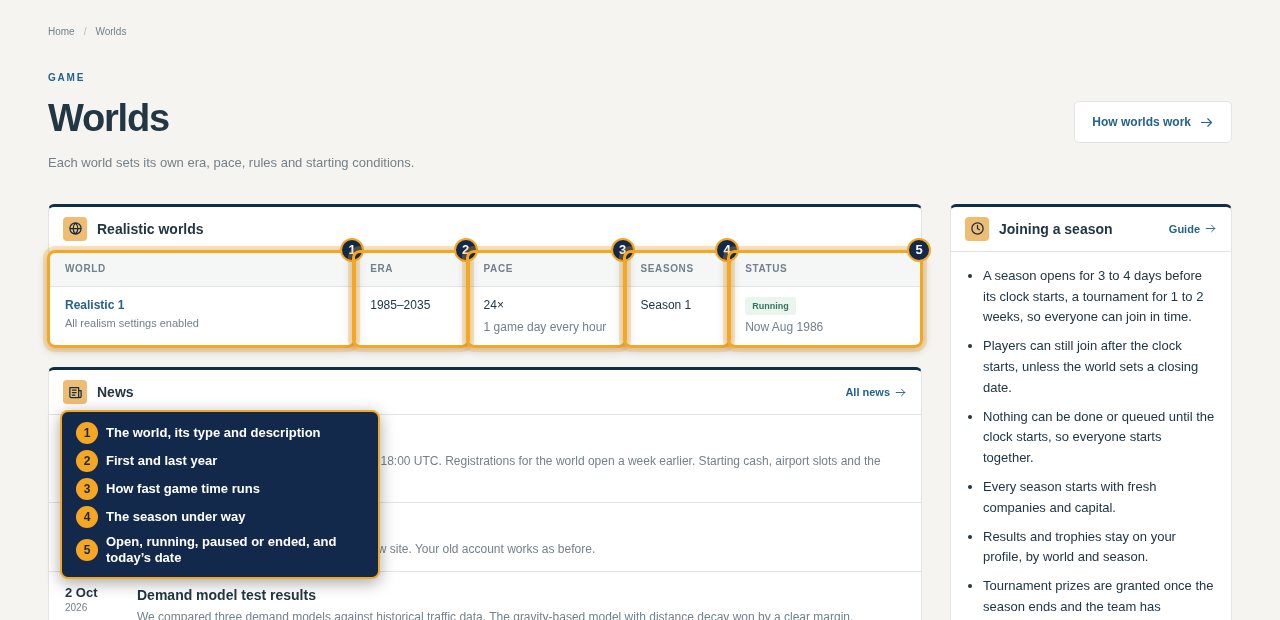
Worlds lists every world open to you, by type: tournaments first, then realistic, open and sandbox worlds.
| Column | Shows |
|---|---|
| World | Its name and description, and a tournament's prizes |
| Era | First and last year, such as 1985–2035 |
| Pace | How fast game time runs, such as 24×, one game day every real hour |
| Seasons | The season under way, or that the world never ends |
| Status | Open for joining, running with today's game date, paused or ended |
Step 3: Join it
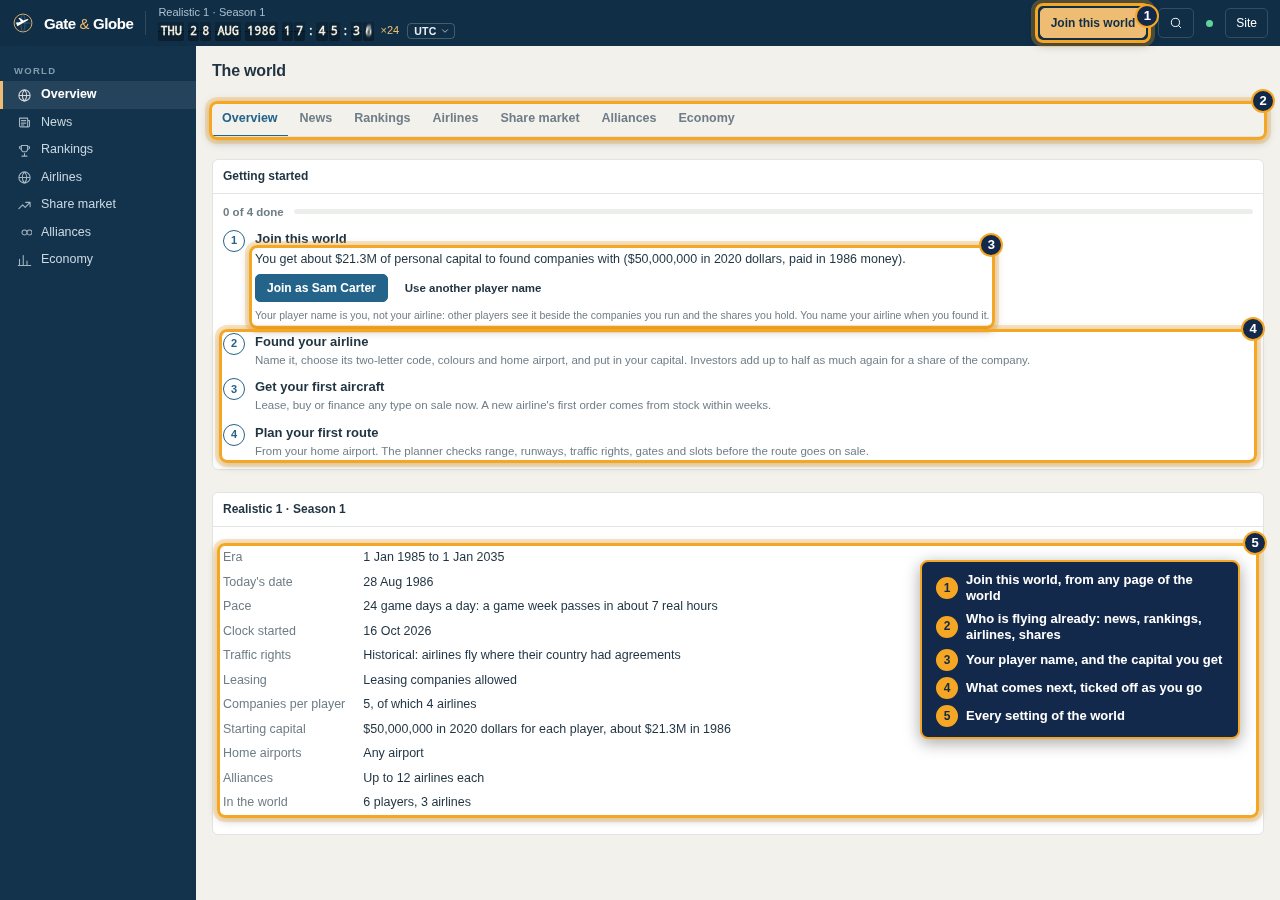
Open the world. Until you have a company there, its Overview starts with Getting started, the four steps from joining to your first route, ticked off as you go. Below it are the world's settings: era and today's date, pace, traffic rights, leasing, how many companies and airlines each player may run, starting capital, home airports, alliance size and how many players are in already. The News, Rankings, Airlines and Share market tabs show who is flying and where.
The first step is joining. Your player name starts as your account name. It is you, not your airline: other players see it beside the companies you run and the shares you hold, and you name the airline in the next step. Press Join as and your name, or Use another player name to change it first. Every page of the world has Join this world in the top bar until you join.
You receive the world's starting capital as personal capital, in the money of the world's year. It is yours, not an airline's: you invest it in companies, buy shares with it and receive dividends into it. Its page is Capital & shares.
Realistic 1 gives each player $50 million in 2020 dollars, about $21.3 million in 1986. It uses historical traffic rights and lets each player run five companies, four of them airlines.
If the season has not started, joining holds your place and founding opens when the clock starts.
Step 4: Name your airline
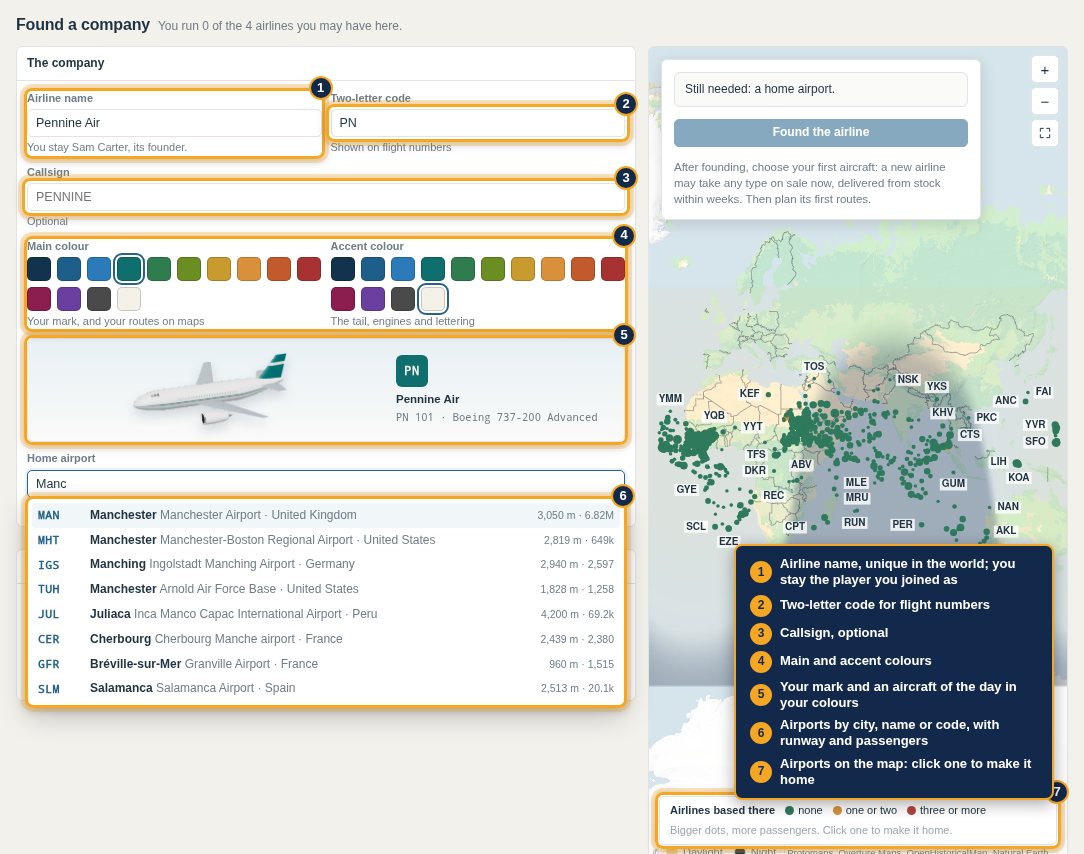
The founding form opens once you have joined.
| Field | What to enter |
|---|---|
| Airline name | Unique in the world. You stay the player you joined as, its founder |
| Code | Two letters or digits for your flight numbers, such as PN 101. The form suggests a free one from the name |
| Callsign | Optional: what air traffic control calls your flights |
| Main and accent colours | Your mark, your aircraft and your routes on maps; the preview shows them on an aircraft of the day |
| Home airport | Search by city, name or code, or click an airport on the map |
Step 5: Choose your home airport
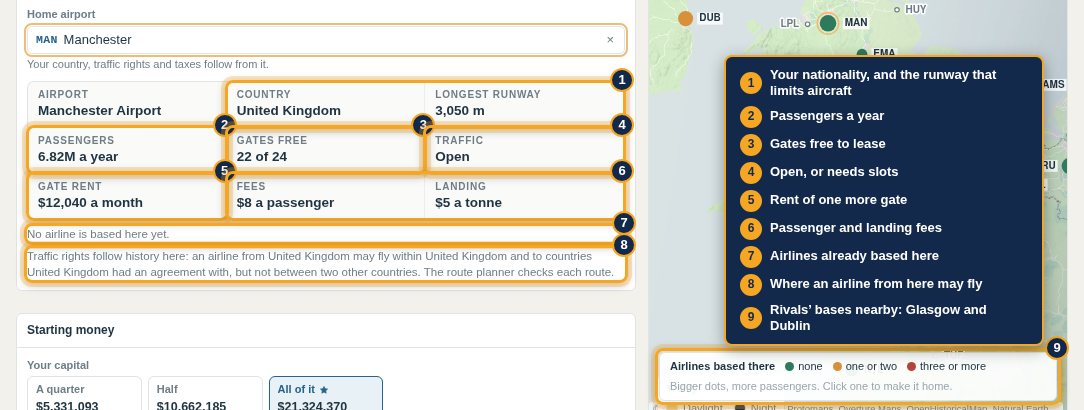
Your home sets your nationality, and with it your traffic rights and taxes. When you pick one, the panel shows:
- The country, and the longest runway, which limits the aircraft that can use it.
- Passengers a year.
- Gates free to lease, whether it is open or needs slots, and the rent of one more gate.
- Its fees: per departing passenger, and for landing per tonne.
- Airlines already based there.
- Where an airline from that country may fly, in worlds with historical traffic rights.
The map shows each airport's size and the bases of other airlines; once you pick one, it shows that airport's largest markets.
The biggest airport in a country is rarely the best start: fees are high, gates are scarce and established airlines hold its best markets.
Pennine Air takes code PN, callsign PENNINE and Manchester: a 3,050 m runway, 6.8 million passengers a year, 22 of 24 gates free, no slots needed, $12,040 a month for a gate, $8 a passenger and $5 a tonne to land, and no airline based there. Liffey Air at Dublin and Thistle Airways at Glasgow are its nearest rivals.
Step 6: Put in the money
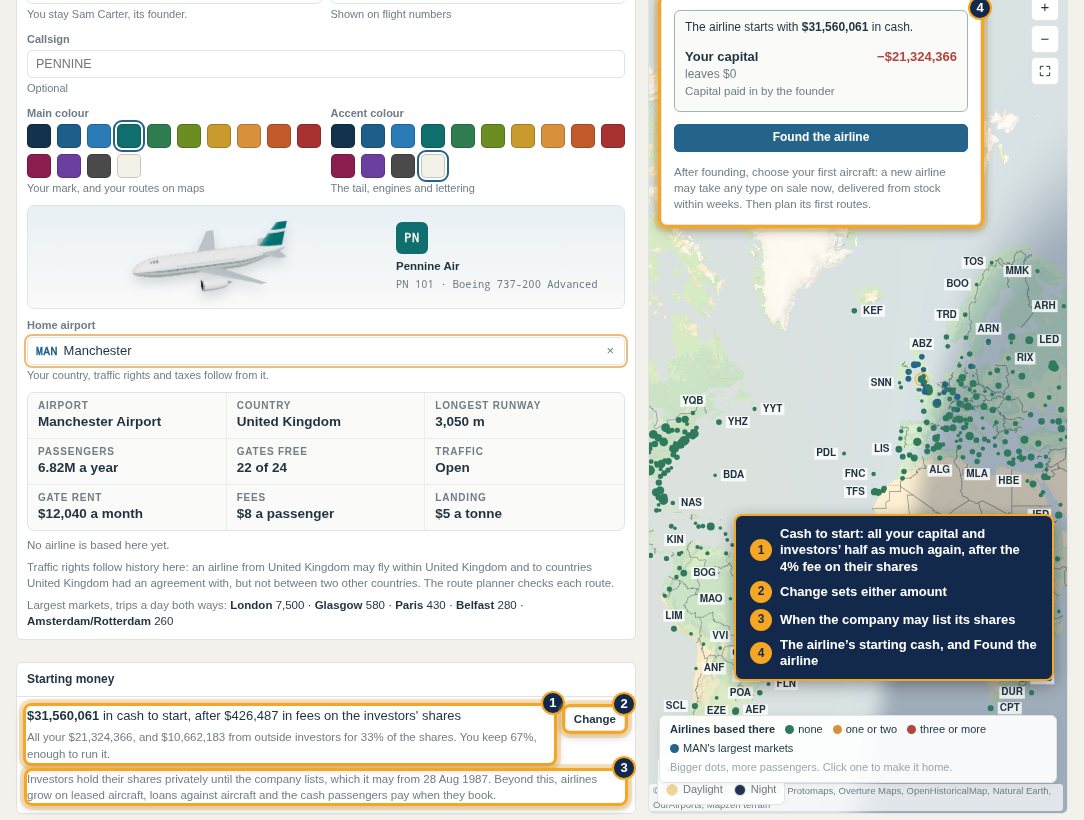
Starting money shows the usual split in one line: all your personal capital, and outside investors adding half as much again for a third of the shares. Press Change to set either amount:
| Field | What to enter |
|---|---|
| Your capital | How much of your personal capital to invest. All of it is the usual choice |
| Outside investors | New shares sold to investors at your price per share, up to half what you put in |
The form shows what that does:
- Control: your share of the company. Two-thirds controls an unlisted company, and with investors at the most you keep exactly that.
- Cash to start: your money and the investors', less a 4% fee on their shares.
- When the company lists its shares. With investors it lists on its first anniversary, and their shares trade on the share market from then; without them it may list from a year after founding, if you choose.
Until the form is complete, the panel beside the map lists what is still needed; then it shows the cash the airline starts with. Press Found the airline.
Pennine Air's founder puts in all $21,324,366 and investors add $10,662,183. After their $426,487 fee the airline starts with $31,560,061, and lists on 28 August 1987.
Beyond this, airlines grow on borrowed money and leased aircraft: lessors take a deposit of a few months' rent, banks lend more as the credit rating improves, and passengers pay for their tickets weeks before they fly.
Step 7: Find your way around
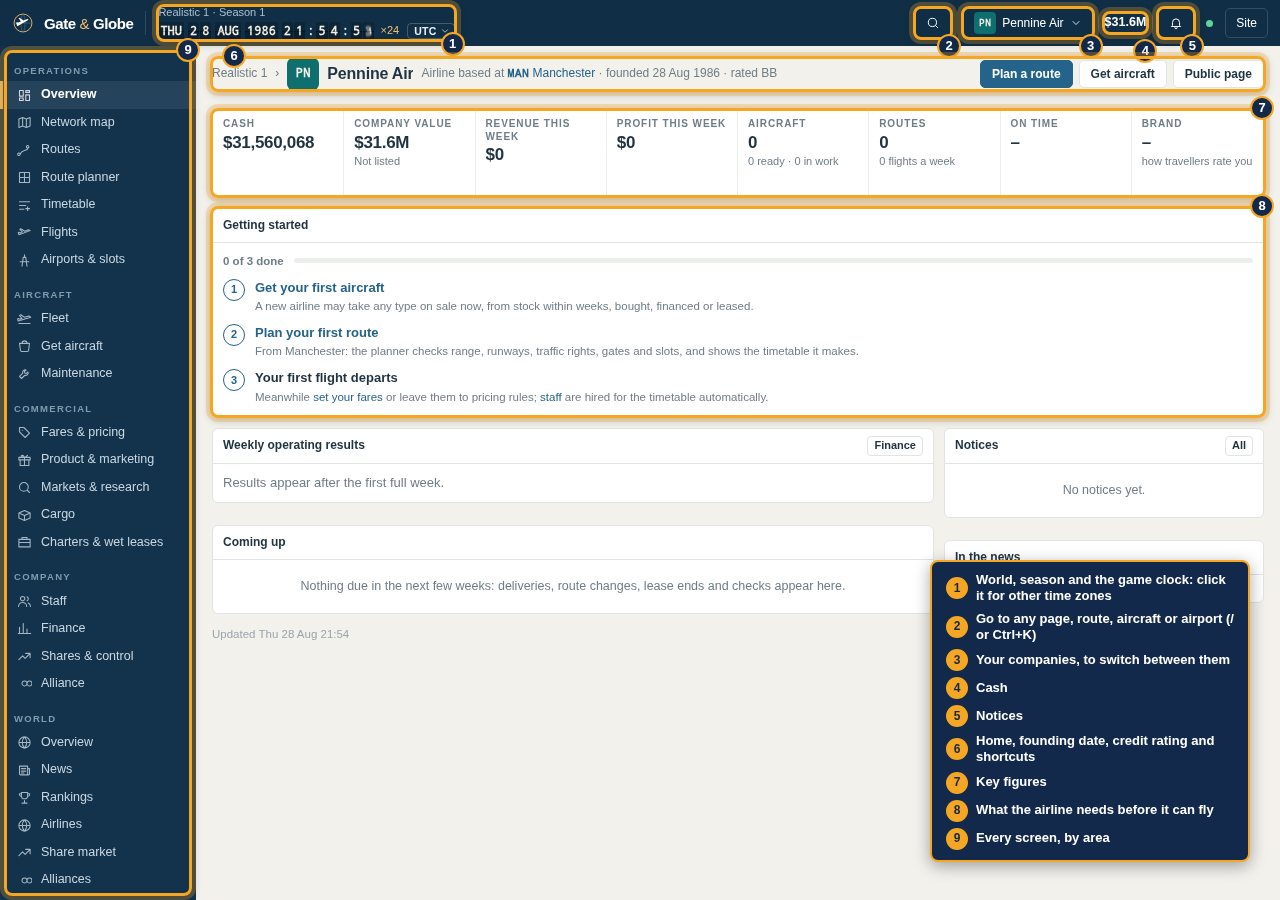
The airline's Overview opens. Across the top bar:
- The world, the season and the game clock, with the pace.
- Go to, a search for any page, route, aircraft, airline or airport.
- Your companies, to switch between them, and the airline's cash.
- Notices.
On the page are the airline's home, founding date and credit rating, its key figures (cash, value, the week's revenue and profit, aircraft, routes, on-time performance and brand) and Getting started: get an aircraft, plan a route, the first flight, each linking to the right page.
The menu reaches every screen: Operations (overview, network map, routes, route planner, timetable, flights, airports and slots), Aircraft (fleet, getting aircraft, maintenance), Commercial (fares and pricing, product and marketing, markets and research, cargo, charters and wet leases), Company (staff, finance, shares and control, alliance), World and You.
Step 8: Tell the time anywhere
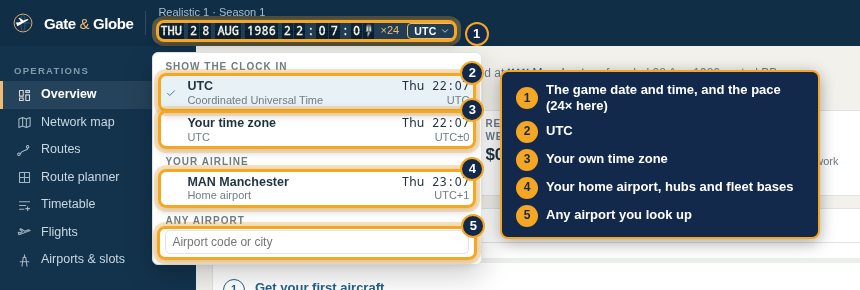
The clock shows the game date and time, and the pace beside it. Click it to show the time in UTC, your own time zone, your home airport, hubs and fleet bases, or any airport you look up. Timetables are in local time at each airport.
Step 9: Go anywhere
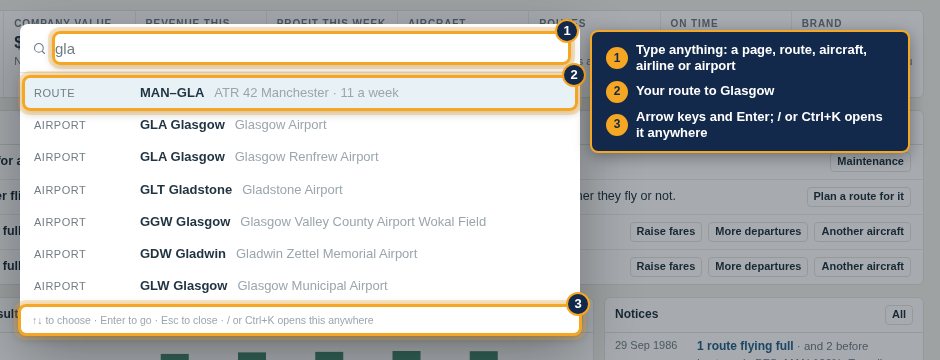
Press / or Ctrl+K, or the search button, and type: a page (such as Loans), a route by its airport codes, an aircraft by registration, an airline or an airport. Arrow keys choose and Enter goes.
Starting settings
Your airline starts with defaults so it can run safely while you learn:
| Setting | Starting value | Where to change it |
|---|---|---|
| Staff pay | Market average for every group | Staff |
| Staff reserve | 10% above what the timetable needs | Staff |
| Hiring | Automatic, toward what the timetable needs | Staff |
| Maintenance | Light checks by your own mechanics, heavy checks contracted out | Maintenance |
| Onboard service | What travellers of the era expect | Product & marketing |
| Fares | The market's reference fare until you set fares or pricing rules | Fares & pricing |
Next: Your first aircraft.